> ## Documentation Index
> Fetch the complete documentation index at: https://docs.boundless.network/llms.txt
> Use this file to discover all available pages before exploring further.
# $ZKC as Proving Collateral
> Using $ZKC as proving collateral on the Boundless market.
* *\$ZKC* is deployed on Ethereum Mainnet and Base Mainnet.
* *\$ZKC* is also bridged to Taiko Alethia.
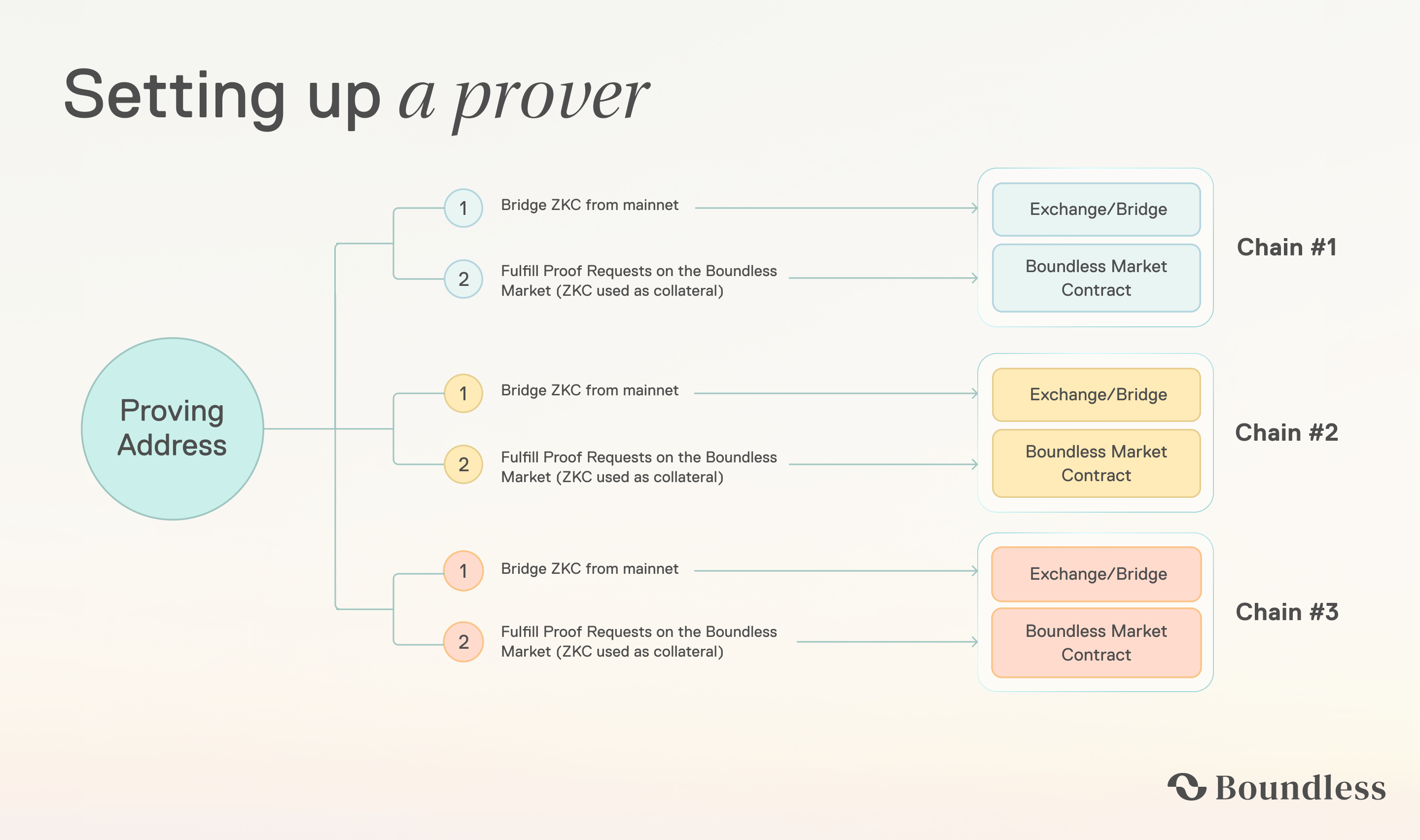
* To use *\$ZKC* in the Boundless market as [Proving Collateral](/provers/quick-start#deposit-collateral) on an L2, *\$ZKC* must be [bridged](/zkc/collateral#bridging-zkc) from Ethereum mainnet to that L2.
* Provers also need a small amount of native ETH on the destination L2 to pay for `depositCollateral` and ongoing market interactions.
Before accepting a proof request, provers must lock *\$ZKC* as collateral in the market, typically *at least* \~10x the request’s maximum fee. If the proof is not fulfilled on time, the prover is slashed; 50% of the collateral is burned permanently, and the remaining 50% is reassigned onchain as a bounty for another prover to complete the work. This system provides a stronger economic guarantee of proof delivery. At the same time, as the request volume grows, the total amount of *\$ZKC* locked increases by a multiple of \~10x, reducing the total circulating supply.
 ## Bridging \$ZKC
*\$ZKC* is deployed at:
* Ethereum Mainnet: `0x000006c2A22ff4A44ff1f5d0F2ed65F781F55555`
* (Bridged) Base: `0xAA61bB7777bD01B684347961918f1E07fBbCe7CF`
* (Bridged) Taiko Alethia: `0xC284A781072442cC1882a8Db4573990B7B49DaC4`
### Bridging using Base's Native Bridges
To bridge *\$ZKC* from Ethereum mainnet to Base mainnet, see the [Base documentation for bridging assets to Base](https://docs.base.org/base-chain/network-information/bridges-mainnet).
### Manual Bridging using `cast`
To start, make sure to have `cast` installed. This will require [installing Foundry](https://getfoundry.sh/introduction/installation/). Next, export the `PRIVATE_KEY` for the address holding the *\$ZKC* tokens:
```bash theme={null}
export PRIVATE_KEY=0x1234...5678
```
Set the `AMOUNT` and `ETH_MAINNET_RPC_URL` environment variables:
```bash theme={null}
export AMOUNT=10000000000000000000 # 10 ZKC
ETH_MAINNET_RPC_URL="https://"
```
with the amount to be bridged, and a valid RPC URL for Ethereum mainnet respectively.
Next, approve the Base bridge to spend \$AMOUNT tokens:
```bash theme={null}
cast send 0x000006c2A22ff4A44ff1f5d0F2ed65F781F55555 \
"approve(address,uint256)" \
0x3154Cf16ccdb4C6d922629664174b904d80F2C35 \
$AMOUNT \
--private-key $PRIVATE_KEY \
--rpc-url $ETH_MAINNET_RPC_URL
```
Finally, bridge \$AMOUNT tokens:
```bash theme={null}
cast send 0x3154Cf16ccdb4C6d922629664174b904d80F2C35 \
"bridgeERC20(address,address,uint256,uint32,bytes)" \
0x000006c2A22ff4A44ff1f5d0F2ed65F781F55555 \
0xAA61bB7777bD01B684347961918f1E07fBbCe7CF \
$AMOUNT \
300000 \
0x \
--private-key $PRIVATE_KEY \
--rpc-url $ETH_MAINNET_RPC_URL
```
### Bridging using Taiko's Native Bridge
Both *\$ZKC* and native ETH are bridged through the same flow. To bridge from Ethereum mainnet to Taiko Alethia, see [bridge.taiko.xyz](https://bridge.taiko.xyz) and [Taiko's contract documentation](https://docs.taiko.xyz/network/contract-addresses). The Taiko relayer mints the bridged tokens on L2 a few minutes after L1 confirmation.
### Manual Bridging to Taiko using `cast`
To start, make sure to have `cast` installed. This will require [installing Foundry](https://getfoundry.sh/introduction/installation/). Next, export the `PRIVATE_KEY` for the address holding the *\$ZKC* tokens:
```bash theme={null}
export PRIVATE_KEY=0x1234...5678
```
Set the `AMOUNT`, `RECIPIENT`, `FEE`, and `ETH_MAINNET_RPC_URL` environment variables:
```bash theme={null}
export AMOUNT=10000000000000000000 # 10 ZKC
export RECIPIENT=0xYour...Address # L2 recipient and refund address
export FEE=100000000000000 # 0.0001 ETH processing fee
ETH_MAINNET_RPC_URL="https://"
```
with the amount to be bridged, the L2 recipient address, the relayer's native ETH processing fee, and a valid RPC URL for Ethereum mainnet respectively.
Next, approve the Taiko `ERC20Vault` to spend \$AMOUNT tokens:
```bash theme={null}
cast send 0x000006c2A22ff4A44ff1f5d0F2ed65F781F55555 \
"approve(address,uint256)" \
0x996282cA11E5DEb6B5D122CC3B9A1FcAAD4415Ab \
$AMOUNT \
--private-key $PRIVATE_KEY \
--rpc-url $ETH_MAINNET_RPC_URL
```
Finally, bridge \$AMOUNT tokens via `ERC20Vault.sendToken`. The L2 `gasLimit` must be at least 1,000,000:
```bash theme={null}
cast send 0x996282cA11E5DEb6B5D122CC3B9A1FcAAD4415Ab \
"sendToken((uint64,address,address,uint64,address,uint32,uint256))" \
"(167000,$RECIPIENT,$RECIPIENT,$FEE,0x000006c2A22ff4A44ff1f5d0F2ed65F781F55555,1000000,$AMOUNT)" \
--value $FEE \
--private-key $PRIVATE_KEY \
--rpc-url $ETH_MAINNET_RPC_URL
```
## Bridging \$ZKC
*\$ZKC* is deployed at:
* Ethereum Mainnet: `0x000006c2A22ff4A44ff1f5d0F2ed65F781F55555`
* (Bridged) Base: `0xAA61bB7777bD01B684347961918f1E07fBbCe7CF`
* (Bridged) Taiko Alethia: `0xC284A781072442cC1882a8Db4573990B7B49DaC4`
### Bridging using Base's Native Bridges
To bridge *\$ZKC* from Ethereum mainnet to Base mainnet, see the [Base documentation for bridging assets to Base](https://docs.base.org/base-chain/network-information/bridges-mainnet).
### Manual Bridging using `cast`
To start, make sure to have `cast` installed. This will require [installing Foundry](https://getfoundry.sh/introduction/installation/). Next, export the `PRIVATE_KEY` for the address holding the *\$ZKC* tokens:
```bash theme={null}
export PRIVATE_KEY=0x1234...5678
```
Set the `AMOUNT` and `ETH_MAINNET_RPC_URL` environment variables:
```bash theme={null}
export AMOUNT=10000000000000000000 # 10 ZKC
ETH_MAINNET_RPC_URL="https://"
```
with the amount to be bridged, and a valid RPC URL for Ethereum mainnet respectively.
Next, approve the Base bridge to spend \$AMOUNT tokens:
```bash theme={null}
cast send 0x000006c2A22ff4A44ff1f5d0F2ed65F781F55555 \
"approve(address,uint256)" \
0x3154Cf16ccdb4C6d922629664174b904d80F2C35 \
$AMOUNT \
--private-key $PRIVATE_KEY \
--rpc-url $ETH_MAINNET_RPC_URL
```
Finally, bridge \$AMOUNT tokens:
```bash theme={null}
cast send 0x3154Cf16ccdb4C6d922629664174b904d80F2C35 \
"bridgeERC20(address,address,uint256,uint32,bytes)" \
0x000006c2A22ff4A44ff1f5d0F2ed65F781F55555 \
0xAA61bB7777bD01B684347961918f1E07fBbCe7CF \
$AMOUNT \
300000 \
0x \
--private-key $PRIVATE_KEY \
--rpc-url $ETH_MAINNET_RPC_URL
```
### Bridging using Taiko's Native Bridge
Both *\$ZKC* and native ETH are bridged through the same flow. To bridge from Ethereum mainnet to Taiko Alethia, see [bridge.taiko.xyz](https://bridge.taiko.xyz) and [Taiko's contract documentation](https://docs.taiko.xyz/network/contract-addresses). The Taiko relayer mints the bridged tokens on L2 a few minutes after L1 confirmation.
### Manual Bridging to Taiko using `cast`
To start, make sure to have `cast` installed. This will require [installing Foundry](https://getfoundry.sh/introduction/installation/). Next, export the `PRIVATE_KEY` for the address holding the *\$ZKC* tokens:
```bash theme={null}
export PRIVATE_KEY=0x1234...5678
```
Set the `AMOUNT`, `RECIPIENT`, `FEE`, and `ETH_MAINNET_RPC_URL` environment variables:
```bash theme={null}
export AMOUNT=10000000000000000000 # 10 ZKC
export RECIPIENT=0xYour...Address # L2 recipient and refund address
export FEE=100000000000000 # 0.0001 ETH processing fee
ETH_MAINNET_RPC_URL="https://"
```
with the amount to be bridged, the L2 recipient address, the relayer's native ETH processing fee, and a valid RPC URL for Ethereum mainnet respectively.
Next, approve the Taiko `ERC20Vault` to spend \$AMOUNT tokens:
```bash theme={null}
cast send 0x000006c2A22ff4A44ff1f5d0F2ed65F781F55555 \
"approve(address,uint256)" \
0x996282cA11E5DEb6B5D122CC3B9A1FcAAD4415Ab \
$AMOUNT \
--private-key $PRIVATE_KEY \
--rpc-url $ETH_MAINNET_RPC_URL
```
Finally, bridge \$AMOUNT tokens via `ERC20Vault.sendToken`. The L2 `gasLimit` must be at least 1,000,000:
```bash theme={null}
cast send 0x996282cA11E5DEb6B5D122CC3B9A1FcAAD4415Ab \
"sendToken((uint64,address,address,uint64,address,uint32,uint256))" \
"(167000,$RECIPIENT,$RECIPIENT,$FEE,0x000006c2A22ff4A44ff1f5d0F2ed65F781F55555,1000000,$AMOUNT)" \
--value $FEE \
--private-key $PRIVATE_KEY \
--rpc-url $ETH_MAINNET_RPC_URL
```